

Note sections
History, procedures and plan go into the mapped TouchWorks note sections. Skip retyping the visit.
Watch note delivery · 0:34 →No more point-and-click. Ambient Scribe captures the visit so you can have your evenings back.
Set up all your clinicians for success — from your early adopters to traditional providers.
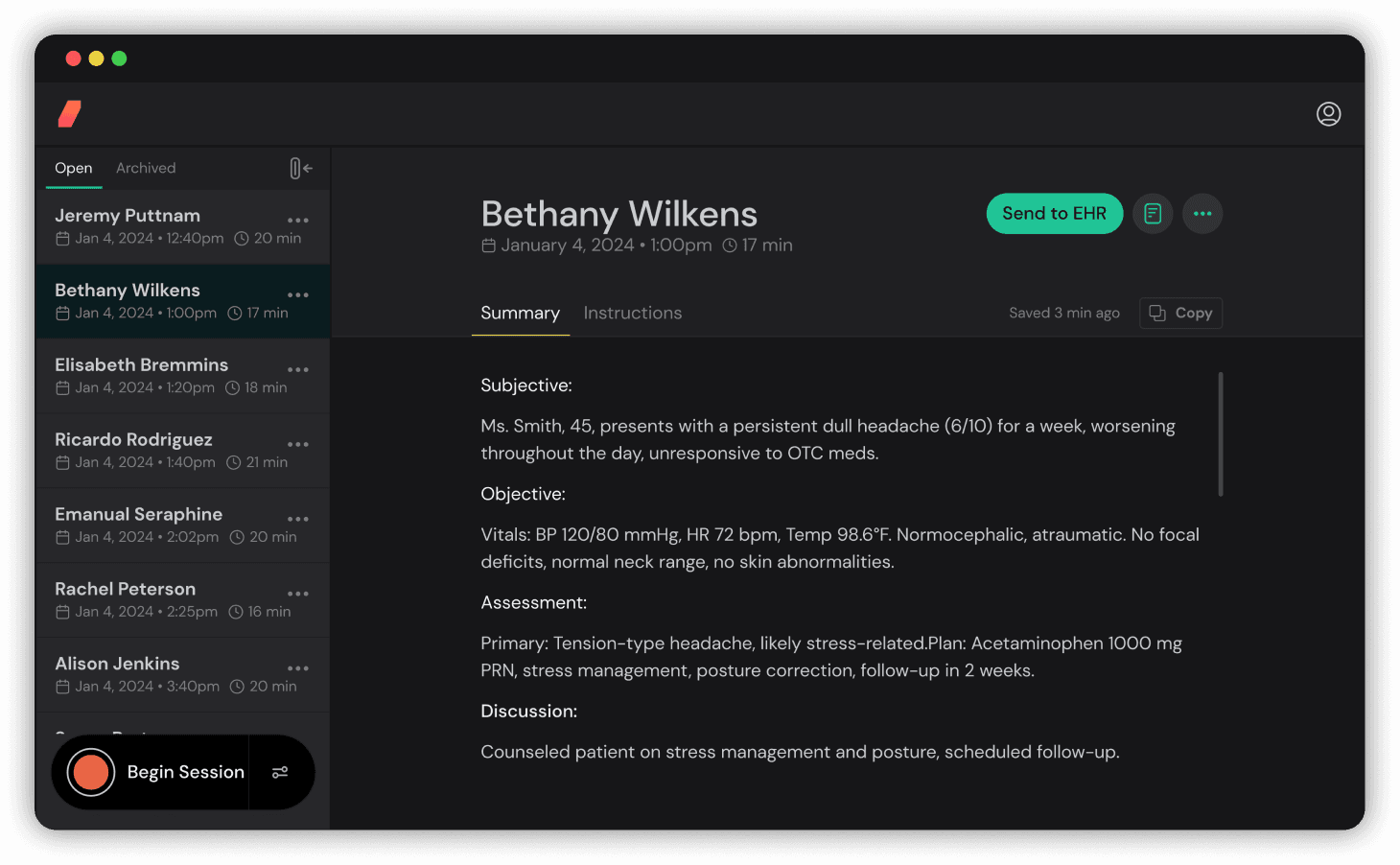
Integrate documentation right into your records.
See transcription as you talk. Generate clinical notes immediately.
Get notes in your writing style with customizable templates.
Generate ICD-10 and CPT code suggestions are generated and sent directly into your EHR.
Clinician is the pilot — easily review, edit, and approve AI-powered drafts.
Optional patient instructions generation or integrate your own.
English, Spanish, and more.
Our advanced audio technology captures multiple speakers in challenging environments with precision.
Support clinicians wherever they work.
Live transcription and AI analysis during patient conversations with sub-60 second note generation.
Healthcare-tuned AI trained on medical terminology and clinical workflows for superior accuracy.
End-to-end encryption with SOC 2 compliance and enterprise-grade security standards.
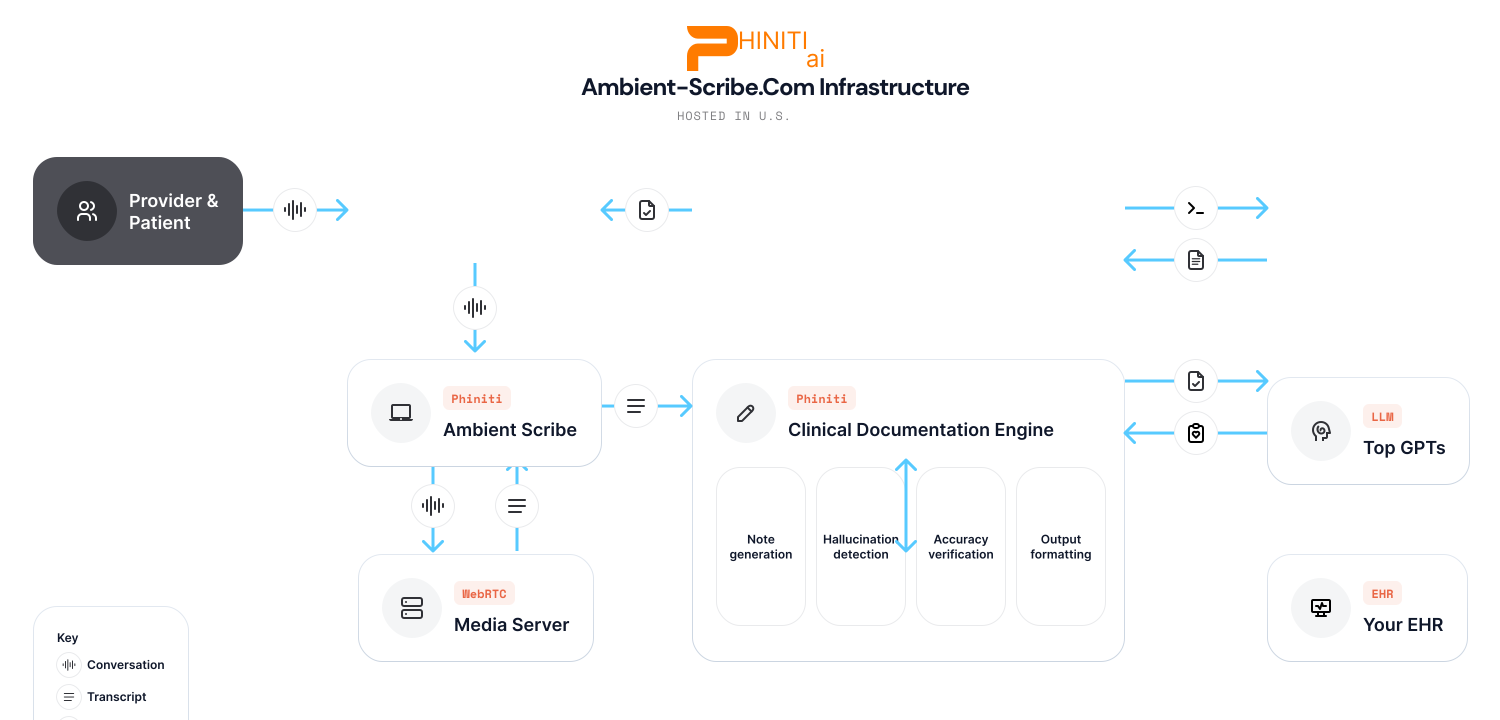
Secure recording of clinical conversation with HIPAA compliance
Medical-grade speech-to-text with speaker identification
Healthcare AI processes conversation for medical context
Generate structured clinical documentation from conversation
Generate ICD-10 and CPT codes based on clinical content
Push notes and discrete data directly into your EHR system
AI-powered review for accuracy and completeness
HIPAA-compliant processing with end-to-end encryption and SOC 2 compliance.
Medical-grade AI models trained specifically for healthcare documentation.
Direct integration with major EHR systems for seamless workflow.
 1:19
1:19Does your scribe capture photos and paperwork too? Bring the conversation, clinical images, documents and team input into one Clipboard for review.
Watch the tutorial → 1:52
1:52Stop entering the same visit twice. See reviewed information reach TouchWorks note sections, diagnosis entries, vitals fields and chart images — from one Clipboard.
Watch the tutorial → 1:50
1:50However you work and whatever your EHR, Ambient Scribe fits in — certified with Veradigm and TouchWorks, connectors for Practice Fusion, Medplum and athenahealth, and any FHIR-based system.
Watch the tutorial → 2:17
2:17Already in the patient's chart? Launch Ambient Scribe with one click — the patient and visit are already in context, no second login.
Watch the tutorial → 2:21
2:21Open the app, sign in once — or skip it entirely — and document any visit. The EHR is optional.
Watch the tutorial → 2:13
2:13See how easy the Clipboard is on mobile: tap record, scan a med list and an insurance card, and hand the doctor a summary with every source artifact — all on one clipboard.
Watch the tutorial → 3:03
3:03The real mobile scribe flow: open the app, pick the visit, hit record, and let Ambient Scribe write the note — all from your phone.
Watch the tutorial → 2:30
2:30Tell Phin the sections, the format, and what you want to capture — Phin builds the template and a matching example, even the advanced logic, then auto-matches it to your note. No typing required.
Watch the tutorial →Capture the conversation, photograph a clinical finding, and add the documents a patient brings in. Review the visit in one Clipboard. Then send the selected information into the right places in your EHR — without entering it all again.
The conversation. The photo. The medication list. The paperwork. Keep the team's contributions together on web, iPad, iPhone and Android.
See photo capture on the Clipboard · 0:28 →See it reach the chart · TouchWorks walkthrough
History, procedures and plan go into the mapped TouchWorks note sections. Skip retyping the visit.
Watch note delivery · 0:34 →Reviewed ICD codes become individual encounter diagnoses, ready in the chart instead of waiting to be entered again.
Review cut: the source includes a diagnosis-code discrepancy; replacement footage is pending.
Blood pressure, pulse and other supported vitals go into their own EHR fields. Capture them once.
Watch vitals delivery · 0:51 →Take a photo or capture paperwork on the Clipboard. Send selected files into the patient chart with the visit context.
Watch image delivery · 1:24 →TOUCHWORKS · PROVIDER-REVIEWED
Supported, matched charge codes can be sent with approved diagnoses after provider review. Coverage depends on your configuration.
EXPANDING COVERAGE
We're expanding supported ordering workflows. Ask us to map your future orders, lab orders and follow-up needs to the capabilities available in your EHR.
The Clipboard is becoming your everyday clinical interface: one place to capture, review and act, with your EHR keeping the chart behind it. Each connected workflow means fewer screens to work through.
You review and choose what to send. Supported fields, files and actions vary by EHR and configuration; this walkthrough demonstrates TouchWorks.
Show us the EHR steps you want to remove →PHIN is your AI-powered assistant for creating and optimizing clinical note templates. Whether you need a SOAP note for cardiology or a custom format for your specialty, PHIN guides you through the process with intelligent suggestions.
Describe your note format in plain language and PHIN creates a complete template
Instant feedback ensures your templates work correctly with your EHR system
After recording, PHIN helps with orders, CPT codes, and patient instructions
Works with primary care, cardiology, surgery, pediatrics, and every specialty in between
You
"Create a SOAP note template for cardiology follow-ups"
PHIN
"I'll create a cardiology follow-up template with sections for cardiac history, current medications, vital signs, physical exam findings, and a structured assessment and plan section..."
Complete your clinical workflow from your phone. Select patient encounters, record visits, and send notes directly to your EHR - no desktop required.
Our iOS and Android apps give you full ambient scribe power at the point of care. No more rushing back to your desk - complete documentation while it's fresh.
View your schedule and select patient encounters directly from your phone
Notes flow directly into patient charts with proper section mapping
Seamless authentication - you'll never see a token expiration error
6 section mapping
8 section mapping
More EHR integrations coming soon. Contact us about your specific EHR requirements.
View Certification DetailsContact sales to discuss your testing needs. We partner with our customers and organizations to fully understand your needs.